

Sources
The Knowledge Base page is the bot’s source manager. It’s where you add new sources, monitor indexing status, retry failed ones, and tell the crawler which URLs to skip.
For the first-time setup walkthrough, see Train your bot. This page covers ongoing management.
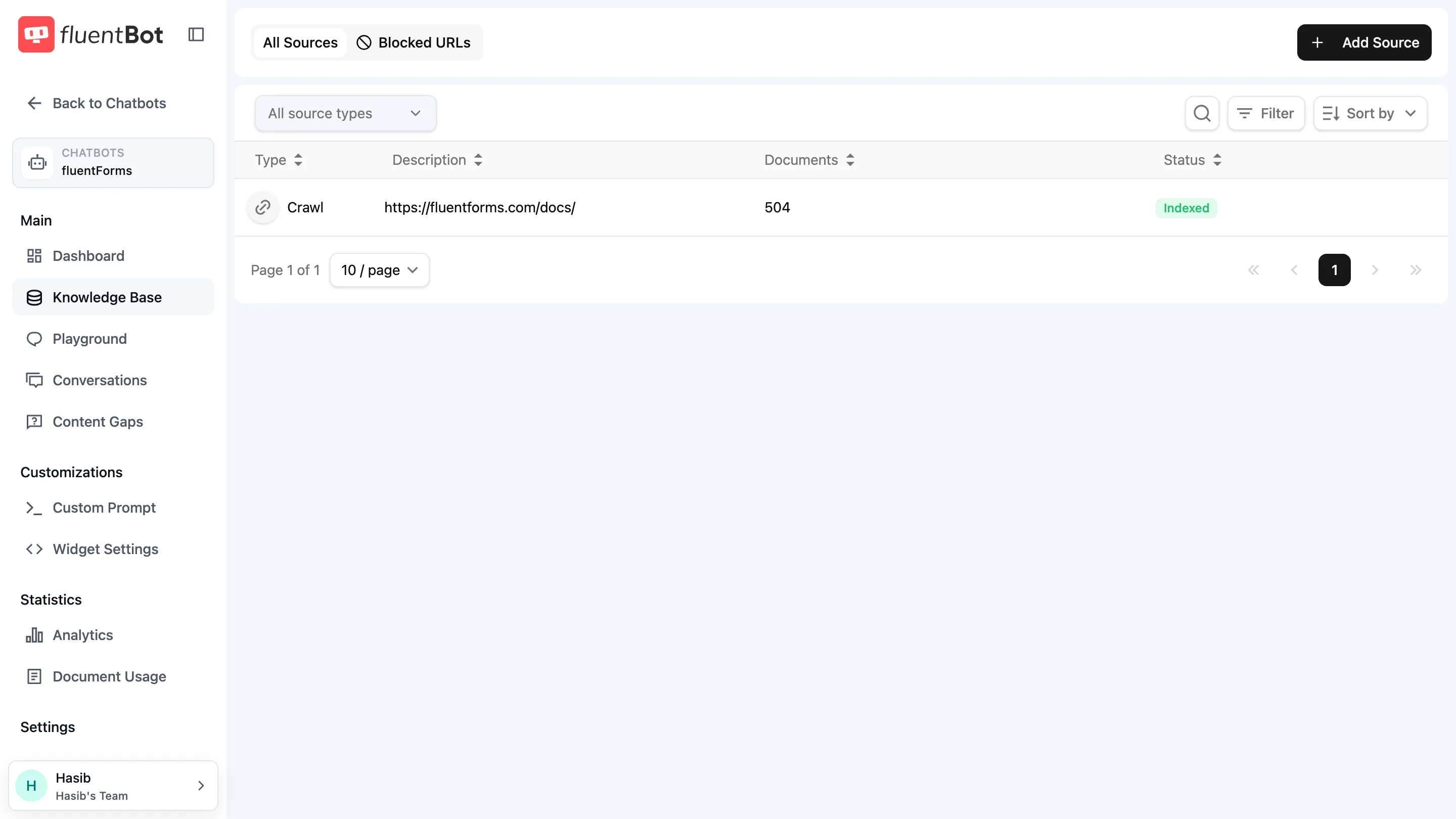
Tabs
- All Sources — every source attached to this bot.
- Blocked URLs — paths the crawler should skip across all Website Links sources for this bot.
Sources table
Columns:
| Column | Notes |
|---|---|
| Type | One of URL, URL List, Crawl, Sitemap, File, Text, Fluent Support. |
| Description | Source title or origin URL / filename. |
| Documents | Indexed-document count. |
| Status | Badge — see status table below. |
Toolbar
Above the table:
- Source type dropdown —
All source typesor one specific type. - Search icon — filter rows by title / description.
- Filter — additional filters (e.g. status).
- Sort by —
created_at,title, ordocuments_count. - + Add Source — opens the source picker (see Train your bot).
Status states
| Status | Meaning |
|---|---|
| Queued | Waiting to start processing. |
| Scraping | Fetching content from the source. |
| Indexing | Saving extracted documents and making them searchable. |
| Indexed | Ready to answer questions. |
| Partially Indexed | Some items succeeded, some failed. Open and click Refresh now. |
| Failed | Every item failed or the source itself is unreachable. Open and click Refresh now. |
| Deleting | Removal in progress. |
Status and document counts update automatically while processing runs.
Source dialog
Click any row to open the source dialog. Contents depend on type:
- Status badge + last update timestamp and indexed-document count.
- Failure reason (if Failed).
- Refresh now button — re-fetches the source on demand; also the retry path for Failed or Partially Indexed sources.
- Documents list — each document has a three-dot actions menu with Refresh, Block this URL, and Delete document.
- Scheduled Refresh dropdown —
Never/Daily/Weekly/Monthly. Website Links sources only. - Delete Source — permanent removal.
See Retrain & update for refresh and retry semantics.
Blocked URLs
A per-bot deny-list. The crawler skips matching URLs for every Website Links source on this bot.
Click Add URL to block to open the dialog:
- URL field — exact URL to block (e.g.
https://example.com/careers). - Also ignore all subpaths toggle — when on, every path under the URL is also skipped (e.g. blocking
/blogignores/blog/post-1).
Existing blocked URLs show in the table with a Remove action.
Use this for paths you never want the bot to learn from: careers pages, legal boilerplate, log-in walls, marketing-only sections that confuse answers.
Troubleshooting
- Status stuck on Scraping — check the source dialog for a failure reason. The source may be hitting rate limits or auth challenges.
- Same URL keeps failing — likely a 404 or login wall. Add it to Blocked URLs so it’s skipped on future refreshes.
- Documents count dropped after refresh — pages that 404 since the last crawl are removed. Open the source dialog to see what disappeared.
What’s next
- Document Usage — drill into the documents each source produced.
- Retrain & update — refresh strategy.
- Content gaps — find questions the current sources don’t cover.