
Bot Dashboard
The bot dashboard is the landing page for a single chatbot. Open it from ChatBots in the sidebar → click any bot, or land here right after creating one.
Stats cards
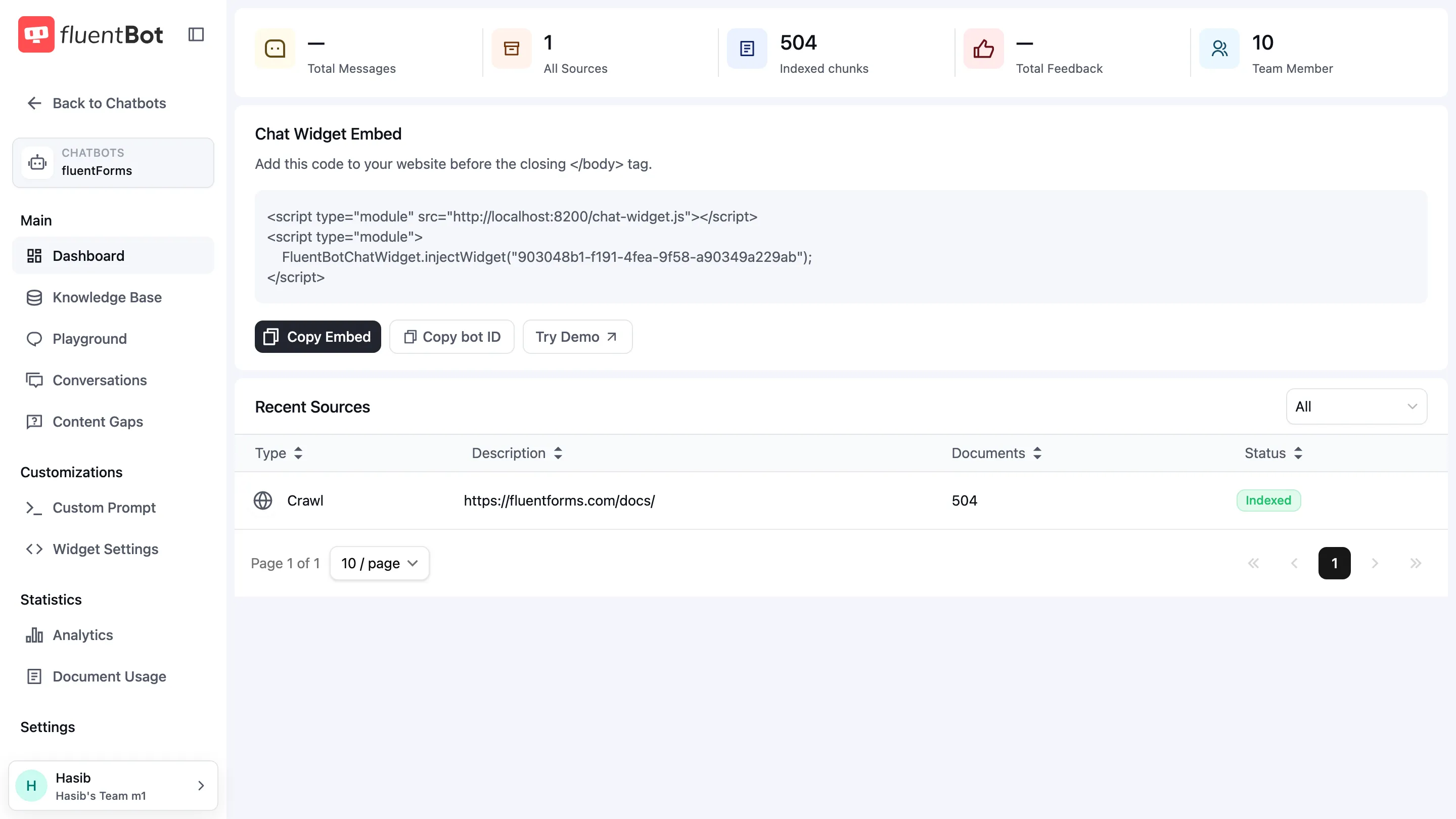
A row of cards across the top summarizes the bot at a glance:
| Card | What it counts |
|---|---|
| Total Messages | All visitor messages handled by this bot. Shows — until the first chat. |
| All Sources | Knowledge sources attached, regardless of status. |
| Indexed chunks | Total indexed documents across all sources for this bot. (UI label says “chunks” but the value is the bot’s document count.) |
| Total Feedback | Thumbs-up / thumbs-down reactions left by visitors. Shows — until first feedback. |
| Team Member | Users in the team with access to this bot. |
These numbers are point-in-time, not deltas. For trends use Analytics.
Chat Widget Embed
Below the stats sits a copy-paste embed snippet block so you can ship the widget to a site without leaving this page. Three actions:
- Copy Embed — copies the two ready-made
<script>tags. - Copy bot ID — copies just the bot’s ID.
- Try Demo — opens the bot in a live demo chat so you can test it immediately.
See Embed the widget for install instructions per platform.
Recent Sources
The table lists the most recently added or updated sources, scoped to this bot. Columns: Type, Description, Documents, Status. Filter the dropdown to show only one source type. Click any row to open the source dialog — same one as on the Sources page.
Bot sidebar
The left sidebar links to the per-bot screens:
Main
- Dashboard — this page.
- Knowledge Base → Sources and Documents.
- Playground → Playground.
- Conversations → Conversations.
- Content Gaps → Content Gaps.
Customizations
- Custom Prompt — set the bot’s tone, system prompt, and fallback behavior.
- Widget Settings → Widget Settings (colors, position, greeting).
Statistics
- Analytics → Analytics.
- Document Usage — which documents got cited and how often.
Settings
- Settings — rename the bot, live web search, MCP tools, answer cache, delete the bot.
What’s next
- Sources — feed the bot more content.
- Playground — test answers before traffic hits.
- Embed the widget — ship the bot to your site.