

Widget Customization
The chat widget is heavily customizable from the bot’s Widget Settings page. Everything below ships without a code change — settings are saved for the bot and applied on the visitor’s next page load.
For the screen-driven walkthrough see Widget Settings. This page is the feature reference: what each control does and the trade-offs.
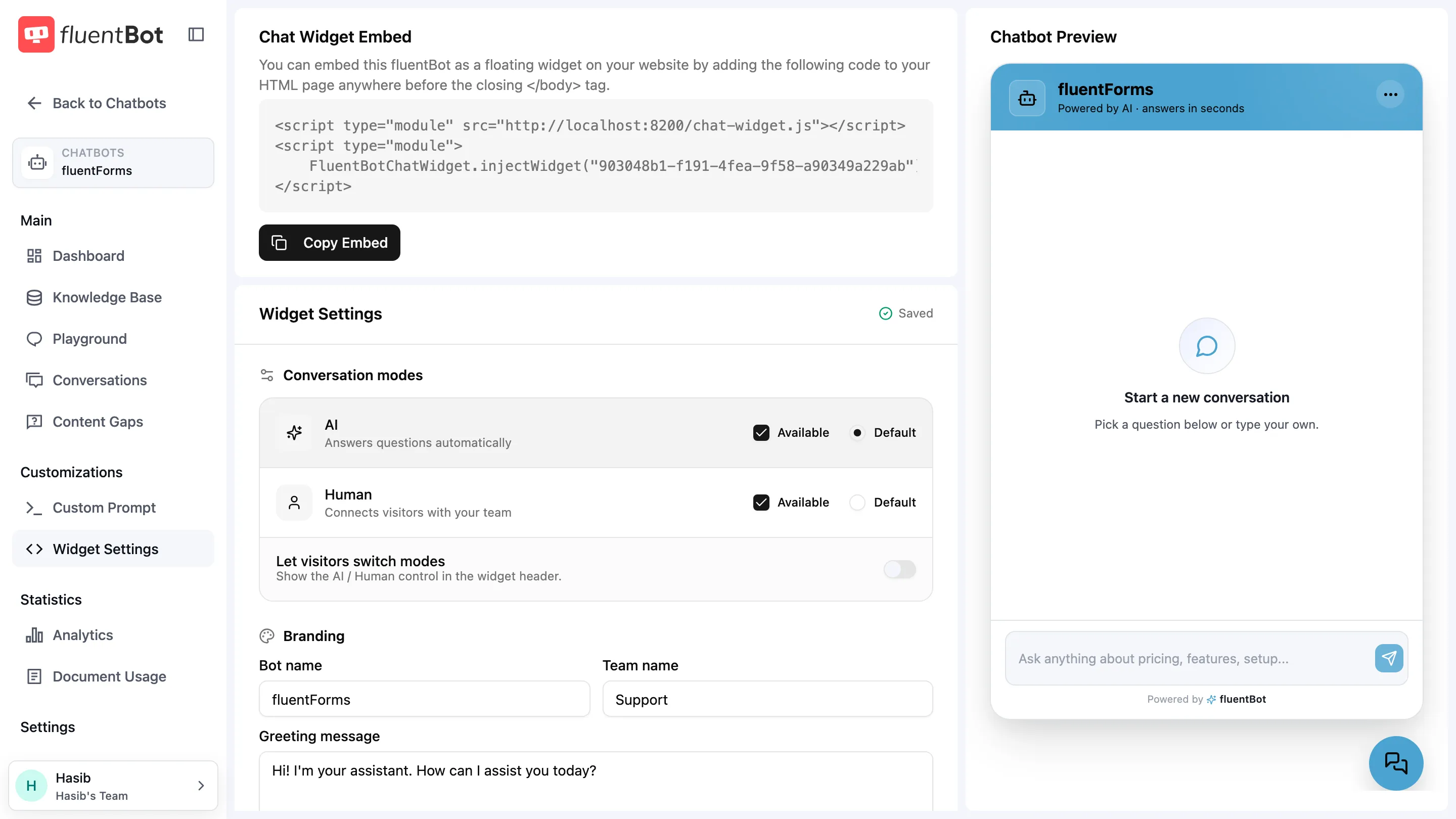
What you can change
Conversation modes
- AI mode — the bot answers questions automatically. Mark it Available and optionally Default.
- Human mode — visitors talk to your team. Same Available / Default controls.
- Let visitors switch modes — show the AI / Human control in the widget header.
Human-only setups (Human available and default, AI unavailable) bypass the bot entirely. Pure self-service is the reverse.
Branding
- Bot name — the header title (e.g. “Acme Support”).
- Team name — the team label visitors see.
- Greeting message — the initial message shown when a visitor opens the widget.
- Bot icon — preset icons (Robot, Support, Chat, Sparkles, Messages, Flash) or a custom logo URL.
Colors & header
- Primary — accent color for launcher, header, and buttons. Hex input + color picker.
- Secondary — supporting tint.
- On-primary text — text color rendered on top of the primary color.
- Header style —
Gradient,Solid, orMinimal.
Pick a primary color with enough contrast against your on-primary text value.
Team agents & handoff
- Team online — toggles online status in the widget header.
- Offer a human after failed answers — show a “Connect with a human” button after the AI misses N answers in a row (
0disables the automatic offer; visitors who ask for a person are still offered one). - Offer a human while the team is offline — visitors can still start a conversation; your team replies when back.
- Auto-reply when agents are slow — send a holding message if no agent replies in time.
See Human Escalation for the full picture.
Quick questions
Up to 10 starter prompts; the top 3 render as clickable chips on the welcome screen. Pick your most-asked questions — visitors who don’t know what to ask will tap one.
Launcher
- Floating button position —
LeftorRightedge of the screen. - Floating button icon — preset icons (Message square, Message circle, Chat bubble, Sparkles, Bot, Smile) or a custom icon URL.
- Show button text — show a short label such as “Ask me” beside the launcher icon. Useful when the icon alone isn’t self-explanatory.
- Show branding — toggles the Powered by fluentBot footer.
Conversation forking
Visitors can branch a conversation from any message. Every saved message in the widget — visitor, AI, or agent — carries a fork icon next to the copy and feedback controls.
Clicking it asks for confirmation:
Fork this conversation? This starts a new AI conversation using the messages up to this point as context. Your current conversation stays unchanged, and the AI continues from here.
How it behaves:
- Non-destructive — the source conversation is untouched and stays in Past conversations; the fork is a separate new conversation.
- History up to the anchor — the new branch is seeded with all messages from the start of the chat up to and including the forked message; everything after it is dropped from the branch.
- Always AI mode — even if the source chat was escalated to a human, the branch talks to the AI. The source escalation keeps running in the background so a late agent reply can’t land in the branch.
- Only saved messages — messages still sending or streaming can’t be forked yet.
- Needs AI mode — forking is available only while the AI conversation mode is enabled for the widget (see Widget Settings).
Use it when a visitor wants to explore a side question from the middle of a long thread without losing the original conversation.
What’s not configurable today
- Custom CSS overrides — the widget renders inside Shadow DOM precisely so host CSS can’t leak in. Custom CSS for the widget itself isn’t exposed.
- Per-page widget variants — one config per bot. To run different greetings on different pages, use a different bot per page.
- Custom fonts beyond the bundled defaults.
- Email capture gating modes from the Widget Settings screen — see Email Capture for what is supported.
Saving changes
Changes autosave — the settings header shows a Saved indicator once stored. Changes propagate to embedded widgets on the next page load — already-open visitor sessions pick up the new settings on their next navigation.
Live preview
The right pane on the Widget Settings page shows a widget-style preview rendered with your draft settings, including the AI / Human tabs and greeting.
Troubleshooting
- Visitor still sees the old widget — they have a cached bundle. New page loads pick up new settings.
- Custom icon doesn’t render — the icon/logo URL must be publicly reachable from the visitor’s browser.
- Color contrast looks wrong — check the On-primary text value against your primary color.
- Widget shows the team as away — see Settings → Availability for operator schedules and the Team online toggle.
What’s next
- Widget Settings — the full settings screen reference.
- Embed the Widget — drop the widget on a real site.
- Identity verification — sign visitor identity for authenticated sites.
- Human Escalation — escalation triggers.