

Document Usage
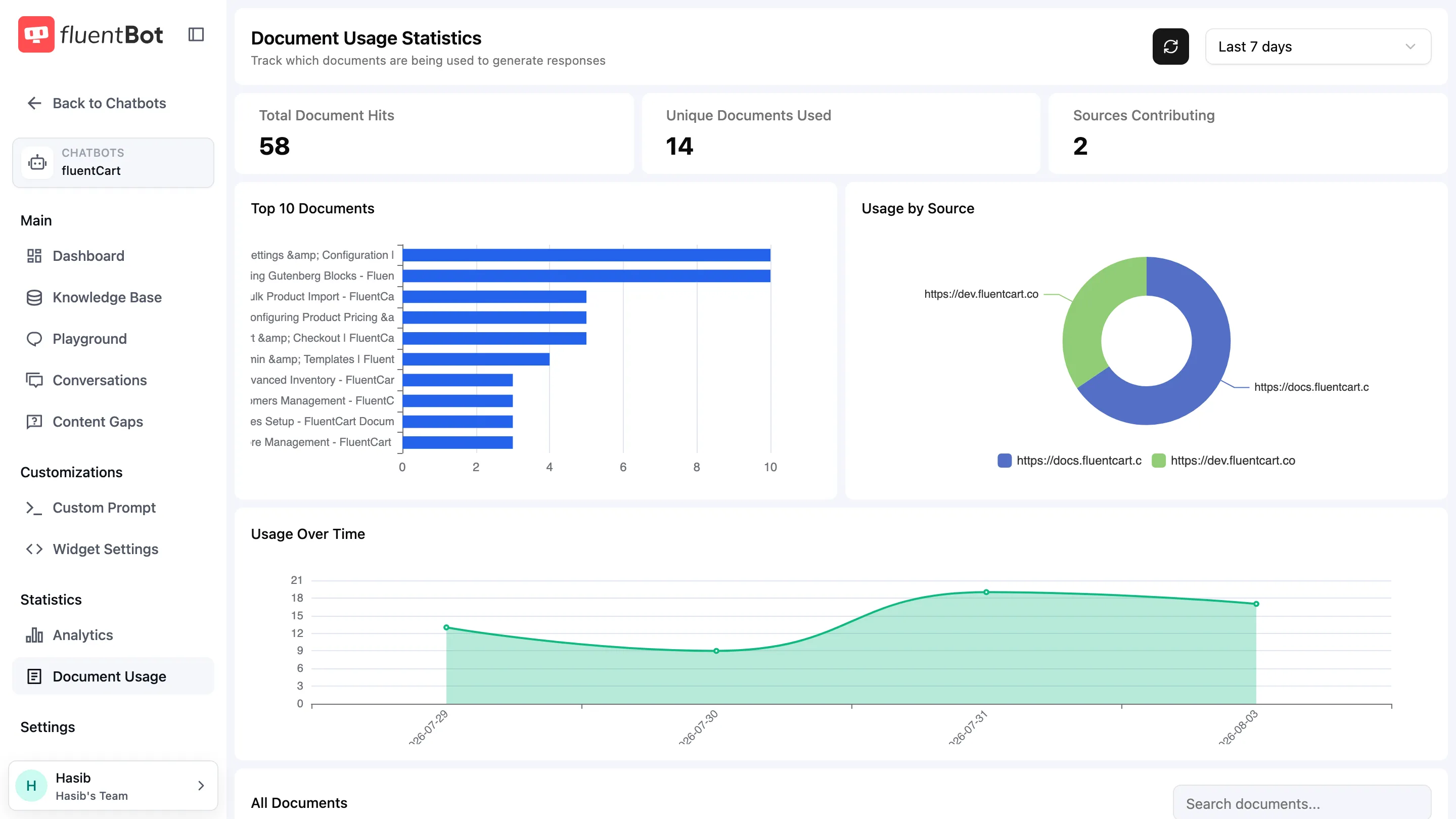
The Document Usage page shows the documents available to the bot, how often each one contributes to answers, and which sources contribute most. It’s the diagnostic counterpart to Sources.
Open it from the bot’s left sidebar → Document Usage (under Statistics).
Source vs. document
Two terms used here:
- Source — what you add (a URL, a sitemap, a file, a Text paste). One source can produce many documents.
- Document — one indexed unit. For a Crawl, one document per crawled page. For a File or Text source, one document per upload / paste. Each row in the All Documents table below is a single document.
When a source is refreshed, its documents are rewritten in place (see Retrain & Update).
Counter cards
Three counters across the top, scoped to the date range:
- Total Document Hits — total times any document contributed to an answer.
- Unique Documents Used — distinct documents hit at least once.
- Sources Contributing — sources with at least one document hit.
Charts
| Chart | What it shows |
|---|---|
| Top 10 Documents | Bar chart of the most-cited documents. |
| Usage by Source | Distribution of hits grouped by source. |
| Usage Over Time | Hit volume across the date range. |
Use these to spot:
- A source dominating answers (probably your most useful content).
- Documents nobody uses.
- Spikes correlating with content drops or marketing pushes.
All Documents table
Columns:
| Column | Notes |
|---|---|
| Document Title | Page title or fallback to URL. |
| Source | Which source the document belongs to. |
| Hit Count | Times this document contributed to answers in the selected range. |
| Last Used | Timestamp of the most recent hit. |
Search the table with the Search documents… field above the rows.
When the bot hasn’t been chatted with yet, the table reads “No document usage data available”; once chats arrive, each cited document gets a row with hit count and last-used timestamp.
Date range
Pick a preset or custom range from the top-right dropdown (default Last 7 days). All counters, charts, and the table respect the selected range.
The Refresh button next to the date picker re-pulls the data without changing the range.
Acting on the data
- Zero-hit documents over a long range — candidates for cleanup in Sources.
- One document hit on every question — usually a generic landing page. Block it in Blocked URLs so the bot has to find more specific sources.
- A failed document with high historical hit count — re-add it as a priority; you’re losing answer quality every day it’s out.
Troubleshooting
- All zeros for a freshly added bot — visitors haven’t asked anything yet. Try the Playground with a question that should match.
- Hit count for a deleted source still nonzero — historical analytics can still show activity for content that has since been removed.
- Big drop in unique documents — check whether a source was deleted or refreshed with fewer pages.
What’s next
- Sources — manage what feeds the document index.
- Retrain & Update — keep documents fresh.
- Content Gaps — questions that don’t match any document.