

Integration
The Integrations page is FluentBot’s API Console. It lets you build, test, and inspect API requests for any bot in your team — request settings, live test calls, and copyable examples included.
Open it from the main sidebar under Settings → Integrations, then pick the bot you want to work with from the Bot dropdown.
For the embeddable widget snippet, see the bot Dashboard or Widget Settings pages, or the Embed the Widget guide.
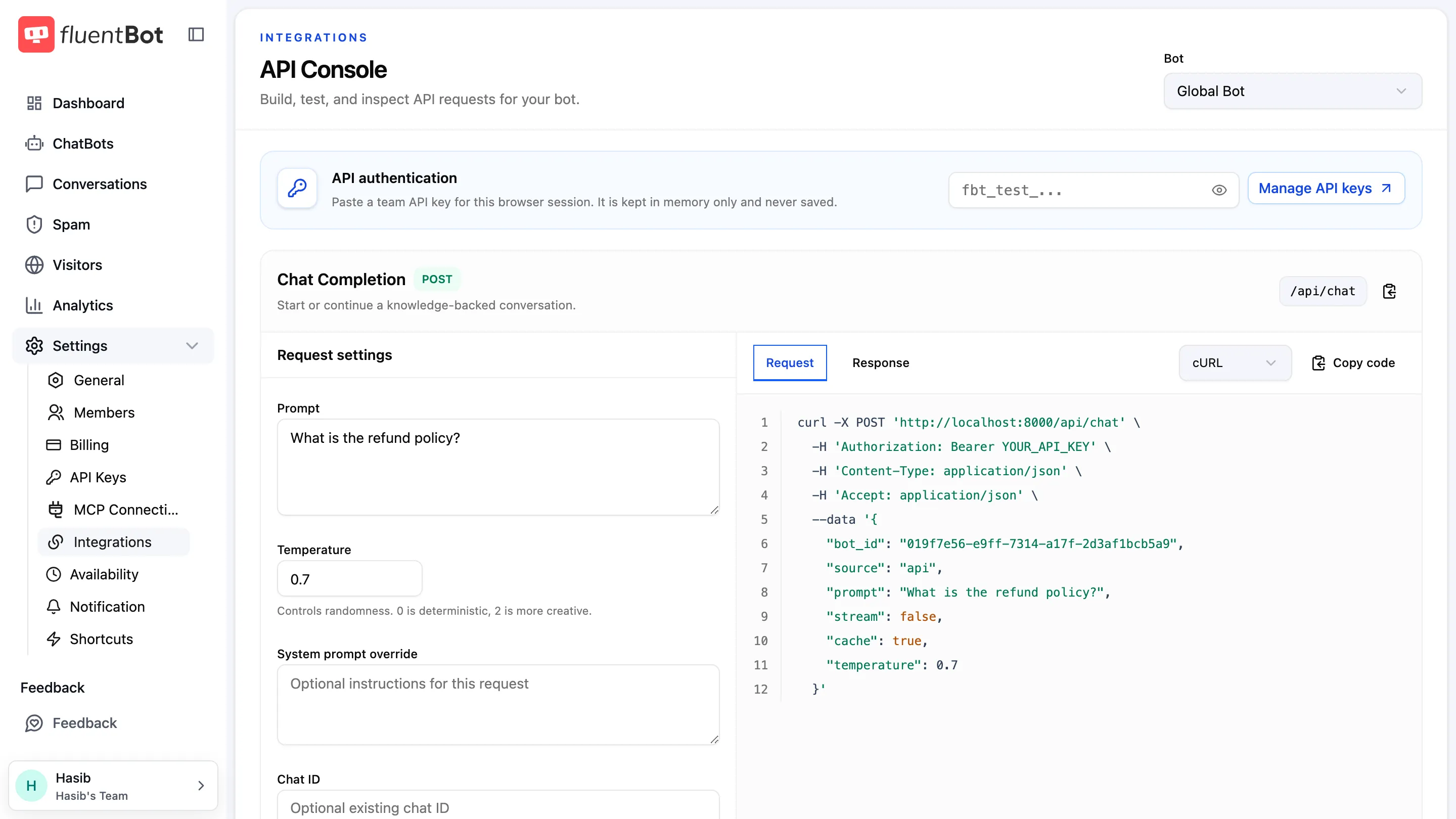
API authentication
Paste a team API key (prefix fbt_) into the API authentication field to send test requests from the console. The key is kept in memory for the browser session only and never saved. Create and manage keys under Settings → API Keys (the Manage API keys link takes you there).
Generated code examples keep the YOUR_API_KEY placeholder so secrets are not exposed on screen or copied accidentally.
Base URL
The hosted FluentBot API base URL is:
https://dash.fluentbot.ai/apiEndpoints
The console shows three endpoints, each with its own request settings and examples:
| Endpoint | Method & path | Use it for |
|---|---|---|
| Chat Completion | POST /api/chat | Start or continue a knowledge-backed conversation. |
| Support Reply | POST /api/chat/fs | Draft a response from an existing support conversation. |
| Responses | POST /api/responses | Generate a focused AI response with optional knowledge. |
Request settings
Each endpoint exposes its tunable fields directly in the console:
- Prompt / Message — the text to send.
- Temperature — controls randomness;
0is deterministic,2is more creative. - System prompt override — replace the bot’s default system prompt for this request.
- Chat ID — continue an existing conversation.
- Cache — reuse cached answers for similar questions (Chat Completion and Support Reply).
- Stream response — receive the answer as a stream.
- Ticket conversation (Support Reply only) — one Customer or Support agent message per line.
- Use knowledge base (Responses only) — toggle knowledge lookup on or off.
Examples are pre-filled with the selected bot’s ID.
Test requests and examples
Click Send test request to run the call against your bot right from the browser — a valid fbt_ API key must be pasted first. Each endpoint shows:
- Request — the JSON body being sent.
- Response — the live or example response.
- cURL — a copyable cURL command.
Click Copy code on any block to grab it.
Credentials
Keep API credentials on your server. Do not place private credentials in public website JavaScript. The embedded widget uses the public bot ID and should be installed with the snippet from Embed the Widget.
For signed visitor identity in the embedded widget, see Identity Verification.
Troubleshooting
- “Paste a valid fbt_ API key” notice — test requests need a team API key in the API authentication field. Create one under Settings → API Keys.
- Unauthorized response — re-check the API key and bot ID.
- Browser CORS issue — route private API calls through your backend.
- Different behavior than the widget — compare the exact request body in your API client with the example shown in the console.
What’s next
- Embed the Widget — full setup walkthrough for the widget.
- Widget SDK — programmatic control over the embedded widget.
- Widget Settings — customize before you ship.